
Table of Contents
If Google Finds a Backlink URL,
Does That Mean It Is Really Indexed?
A CenturyLink Guest Post Case Study and a Backlink Verification Workflow
What Does This Article Explain?
Many people accept a guest post after checking only whether a site: search finds its URL. This test shows that a URL appearing on Google does not mean the article text, anchor text and destination link are fully indexed. This article explains the difference and provides a repeatable backlink verification process.
Does Finding a Backlink URL on Google Mean It Is Indexed?
Many people who work with guest posts and SEO backlinks use just one acceptance check: search for the article URL on Google with site:. If it appears, they take a screenshot and tell the client, “It is indexed.”
site:https://example.com/article/example
I used to treat whether Google could find the URL as an important sign that a backlink was indexed. But while checking a newly published backlink today, I found a typical issue worth documenting.
Key Takeaway
Finding a URL on Google and confirming that Google has fully indexed the article text, anchor text and destination link may be different things. This distinction matters especially for guest posts, syndicated press releases and so-called major-media backlinks.
An Unexpected Finding During a Backlink Indexing Check
The article was published under the Finance Press section of CenturyLink.net. Its URL existed, and the full content was visible in a browser. In the usual first Google check, I could find the URL and locate the page using keywords from the article title.
However, the search result used the template title “Finance Press – CenturyLink” instead of the actual article title. Its description also used the section template: “Search the latest press releases by stock symbol or keyword.”

Figure 1 | Google finds the URL, but the search result shows the shared Finance Press template instead of the article title.
Under the usual “searchable URL = indexed” acceptance rule, this could already be marked Indexed: YES. But this is where the real question begins: has Google indexed the article, or does it only recognize the URL and page template?
Next Check: Exact Sentences from the Article
To check whether the body text was indexed, I stopped searching for the title and selected distinctive sentences from the middle and end of the article for exact-match searches. For example:
site:centurylink.net “technicians can focus on the fault that actually needs repair”
There was no exact match. Tests with other distinctive sentences gave similar results.

Figure 2 | The URL is searchable, but an exact search for a distinctive sentence near the end returns no matches.
The First Important Warning Sign
A URL appearing on Google does not mean its body text is consistently searchable in Google’s text index. One site: test cannot establish this conclusively, but a visible URL combined with several unsearchable sentences deserves further investigation.
Testing the Target Anchor Text
The anchor text intended to carry the SEO signal was “common fiber optic connector types”. I therefore ran another exact-match search:
site:centurylink.net “common fiber optic connector types”
Again, there was no exact match. Without quotation marks, Google could find the CenturyLink page but displayed a “Missing” terms notice. This suggests some topical association with the page, but it does not confirm that the complete anchor text is consistently indexed.

Figure 3 | The exact anchor text returns no match. A broader search finds the page, but Google flags missing terms.
Checking the Destination Domain
Next, I searched directly for the destination domain mentioned in the article:
site:centurylink.net “yfconnectivity.com”
There were still no results. The four checks now told different stories: Google could find the URL, but the article text, anchor text and destination domain were not equally searchable.
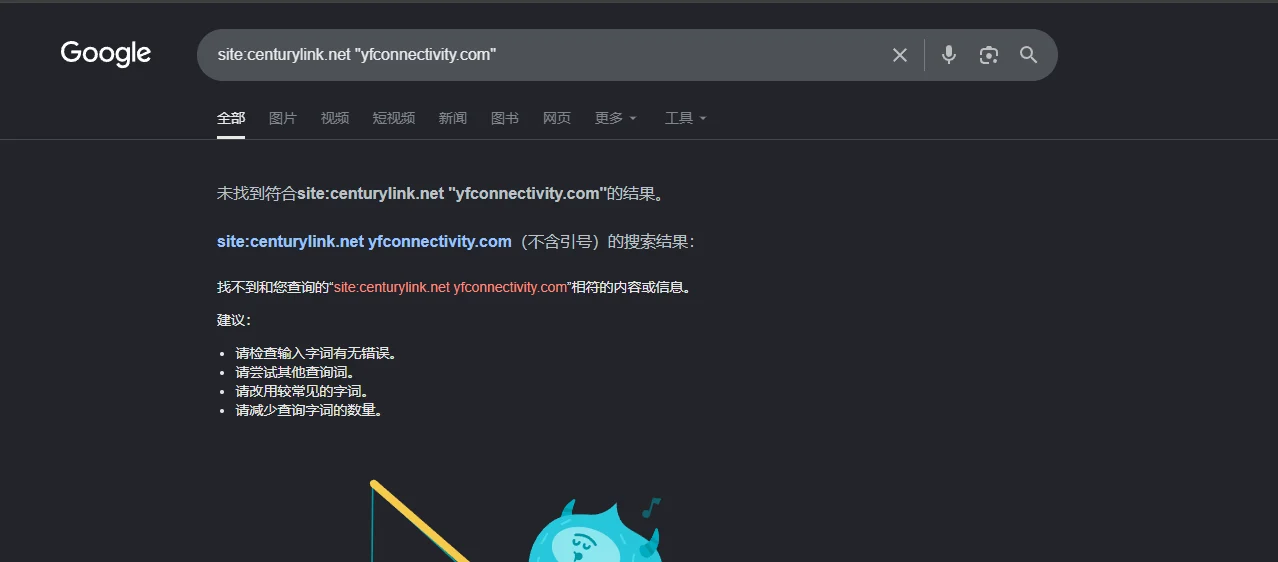
Figure 4 | An exact search for the destination domain also returns no results.
What I Call a “Shell Index”
I provisionally call this a “Shell Index” or “URL Shell Indexed” state: Google has discovered and displayed the URL or page shell, while full indexing of the article text, anchor text and destination link remains uncertain.
A site: search is not the URL Inspection tool in Google Search Console, nor does it give direct access to Google’s index. Not finding a sentence therefore does not prove that Google has never read it. Still, it is a useful warning sign when checking guest post delivery and publishing-site quality.
Why This Happens with “Major Media” Backlinks
Many backlinks sold as placements on Yahoo, MSN, TV stations, major US media or high-DR news sites are not articles written by those sites’ editors to cite your business. Many are actually syndicated press releases, financial content feeds or third-party content distribution.
Press release source → Third-party feed or syndication → Article URLs on multiple high-authority domains
The article text may load dynamically through JavaScript.
The content may come from an iframe or third-party feed.
The page may use a shared title and description template.
The canonical tag may point to another version.
The same article may appear on dozens of domains.
The page may have almost no internal links and become an orphan page.
A Common Misunderstanding
A strong domain does not guarantee a strong article page. DR and DA are third-party, domain-level metrics, not a pool of authority that every URL automatically inherits.
A DR 90 Domain Does Not Guarantee a Valuable Page
Many backlink price lists show only the website, DR, traffic and price. Clients see DR 90+ and assume the placement must be strong. But acceptance checks should start with these questions: Where is the article published? Is the URL crawlable? Is the body text served directly in HTML? Is the anchor text indexed? Does the link use a standard <a href="">element? Does it carry nofollow or sponsored attributes? Where does the canonical point? Are there internal links to the page? Is it an editorial guest post or syndicated content?
Without resolving these questions, DR alone tells you very little.
The KennyDTC Backlink Verification Workflow
After this CenturyLink test, I divided guest post verification into nine checks. Instead of recording only Indexed: YES or NO, I now assess indexing quality.
1 | Check That the URL Works
The article should open normally with a valid HTTP response: no 404, redirect to the homepage or category page, or mandatory login.
2 | Check Whether Google Finds the URL
Use site:URL and site:domain plus the full title for an initial check. Finding the page only clears the first step.
3 | Check Whether the Full Text Is Searchable
Choose one distinctive sentence of around 10–20 words from the beginning, middle and end, then run exact-match searches. Record 3/3 as Full Content Indexed, 1–2/3 as Partial, and investigate a possible Shell Index if none match but the URL appears.
4 | Check the Anchor Text
Search site:domain “target anchor text”. An exact match is a strong positive sign. If there are no results, mark it Unconfirmed rather than declaring the link worthless.
5 | Search for the Destination Domain
Search site:domain “clientdomain.com”. If the article text, anchor text and destination domain are all unsearchable, raise the risk level even if the URL appears.
6 | Inspect the HTML Link
The ideal structure is a standard HTML link:
<a href="https://client.com/...">anchor</a>Also check for nofollow or sponsored link attributes, JavaScript click events, intermediate redirect pages and iframes.
7 | Check the Canonical URL
Prefer a self-referencing canonical. If a page on bigmedia.com points its canonical tag to another source, do not treat that version as a fully independent editorial page.
8 | Identify Syndicated Content
Search an exact, distinctive sentence without site:. The more domains publishing the same copy, the more it resembles mass press-release syndication rather than independent editorial content.
9 | Check Internal Links
Check whether the article is accessible through real internal links from the homepage, news section, category pages or related posts. Downgrade an orphan page that can only be reached through its direct URL.
Use Four Indexing Statuses
Status
Assessment
What It Means for Acceptance
Full Indexed
The URL, body text, anchor text and destination link pass the checks.
Highest priority; eligible for the verified backlink portfolio.
Partial Indexed
The URL and some body text are searchable.
Monitor further and check rendering, canonical tags and internal links.
Shell Indexed
The URL appears, but the body text, anchor or destination domain is hard to find.
High risk; an indexing screenshot alone is not enough for acceptance.
Not Indexed
No clear evidence that the URL is indexed.
Indexing acceptance is not yet complete.
A Practical 100-Point Scorecard
Metric
Points
URL Indexed
10
Full Content Indexed
20
Anchor Indexed
10
Target Domain Indexed
5
<a href=""> is crawlable
15
Follow
10
Self Canonical
10
Valid internal links
10
Not mass-syndicated
5
Industry relevance
5
Suggested ratings: 90–100 = A+ Premium Editorial; 80–89 = A High-Quality Guest Post; 70–79 = B+; 60–69 = B; 45–59 = C Supporting Link; 30–44 = D PR/Syndication. Below 30: not recommended for purchase.
Mandatory Downgrades: DR Cannot Fix Technical Issues
Issue
Suggested Maximum Rating
The URL exists, but its body text remains unindexed over time.
C
The destination link cannot be rendered or crawled.
D
The link does not use a standard <a href="">
D
The canonical points to another domain.
C
An iframe loads the full article from a third party.
C
Mass Syndication
B
Sponsored
B
Orphan Page
B
How Should We Rate This CenturyLink Page?
Check
Result
URL Indexed
 Searchable
SERP title
 Shared Finance Press template
Distinctive body sentences
 No exact match found yet
Anchor Text
Exact match unconfirmed
Destination domain
No exact-search results
Page type
Possible syndicated press release or feed
Current recommendation
C | Shell / Partial Indexed | Recheck in 7–14 days
I would raise the rating if, after 7–14 days, the article text, anchor text and destination domain become consistently searchable and technical checks confirm a crawlable <a href="">element, a valid canonical and internal links to the page. Even if it eventually becomes fully indexed, I would not automatically equate it with an editorial link deliberately added by CenturyLink’s own editors.
Do Syndicated Backlinks Have Value?
Yes, but its role needs to be understood correctly. Syndication is better suited to brand exposure, entity mentions, brand search-result coverage, press-release distribution and a supporting backlink mix. It does not mean that “50 DR 80+ domains = 50 premium editorial backlinks”.
The Key Distinction
Press-release distribution can be useful, but appearing on a high-DR domain and earning a direct editorial citation from that site are very different SEO assets.
The KennyDTC Assessment Process
URL exists → Google discovers the URL → Body text indexed → Anchor recognized → Destination link crawlable → Canonical → Internal links → Editorial or syndicated content → Finally, assess DR, traffic and industry relevance
Keep this order. DR describes a domain’s overall backlink profile; it cannot guarantee that the specific page you buy today will carry the same value.
Final Thoughts
This CenturyLink case illustrates the problem clearly. Under the usual acceptance process—search for the URL, find it, take a screenshot and stop—it could easily be marked Indexed . But three further checks of the body text, anchor text and destination domain lead to a very different assessment.
When a Supplier Says “It Is Indexed”, Ask One More Question
Is only the URL indexed, or has Google also indexed and recognized the article text and my backlink, with the link available for normal crawling?
That difference may determine the backlink’s actual SEO value.
References
• Google Search Central: Search operators and the uses and limitations of site:
• Google Search Central: How to make links crawlable
• Google Search Central: JavaScript SEO basics
• Google Search Central: Canonicalization
KennyDTC · Practical SEO / Guest Posts / Backlink Quality Assessment